The Evolution of Web Scraping: From LWP::Simple to Headless Browsers
Web scraping has evolved from simple one-liners that fetched static HTML into a cat-and-mouse game involving headless browsers, fingerprint evasion, and infrastructure that scales like a distributed system. This article traces that evolution, covers the techniques that matter today, and walks through a fully working Snapchat Discover crawler that extracts post metadata while behaving like a real user.
Introduction
Every data engineer, security researcher, and intelligence analyst has at some point needed data that lives behind a web page. The practice of extracting that data programmatically — web scraping — is as old as the web itself. What started as fetching a URL and parsing its HTML has grown into a discipline with its own tools, countermeasures, and engineering challenges.
At Hunt-Benito, scraping is one of our core competencies. We’ve built crawlers for OSINT collection, price monitoring, competitive intelligence, and security assessment. Over the years the landscape has changed dramatically — and it’s worth understanding both where we came from and where we are now, because the techniques you need depend entirely on what you’re scraping and who’s trying to stop you.
Part 1: Historical Evolution
The Early Web (1993–2000): “Just Fetch the HTML”
The first search engines were crawlers. In 1993, Matthew Gray’s Wandex and JumpStation were among the earliest bots that systematically fetched web pages and indexed them. These were trivially simple — open a TCP socket, send an HTTP GET request, read the response, extract links, repeat.
The tools of this era were basic:
| Tool | Language | Year | Notes |
|---|---|---|---|
LWP::Simple |
Perl | 1995–1996 | get("http://example.com") — one line to fetch a page |
wget |
C | 1996 | Recursive download, still widely used today |
libwww-perl (LWP) |
Perl | 1995 | Full HTTP client library with cookie jars, redirects |
curl |
C | 1996 | Command-line data transfer, the Swiss Army knife of HTTP |
Web::Scraper |
Perl | 2009 | CSS/XPath selectors on top of LWP |
Beautiful Soup |
Python | 2004 | HTML/XML parser tolerant of malformed markup |
In this era, scraping was straightforward. Pages were static HTML. There were no CAPTCHAs, no rate limiters, no JavaScript-rendered content. You fetched the page, parsed the HTML, and extracted what you needed. A Perl one-liner could scrape a site:
use LWP::Simple;
my $html = get("http://example.com/products");
# parse $html with regexes or HTML::TreeBuilder
The only challenge was that the web was slow and unreliable. Timeouts, broken connections, and malformed HTML were the real enemies — not anti-bot systems.
The Ajax Era (2005–2012): JavaScript Changes Everything
Around 2005, two things changed the scraping landscape. First, AJAX (Asynchronous JavaScript and XML) became mainstream. Pages were no longer static HTML — they loaded content dynamically via JavaScript after the initial page load. Second, websites started caring about bots. The first generation of anti-scraping measures appeared: rate limiting, IP blocking, and user-agent filtering.
Tools adapted:
| Tool | Language | Year | Approach |
|---|---|---|---|
| Scrapy | Python | 2008 | Full-featured crawling framework with middleware, pipelines, scheduling |
| Selenium RC | Java/JS/Python/Ruby | 2004 (RC), 2009 (WebDriver) | Browser automation — could execute JavaScript |
| Mechanize | Python/Ruby/Perl | 2003–2010 | Headless HTML interaction with cookie/session management |
| PhantomJS | JavaScript | 2011 | Headless WebKit — the first widely-used headless browser for scraping |
Scrapy was the big leap forward for Python-based scraping. It gave you a proper framework with:
- Spiders: classes that define how to crawl a site
- Middleware: pluggable components for retries, proxies, user-agent rotation
- Pipelines: post-processing hooks for cleaning, deduplicating, and storing data
- Scheduling: URL frontier management with politeness controls
import scrapy

class ProductSpider(scrapy.Spider):
    name = "products"
    start_urls = ["https://example.com/products"]

    def parse(self, response):
        for product in response.css(".product"):
            yield {
                "name": product.css("h2::text").get(),
                "price": product.css(".price::text").get(),
            }
        next_page = response.css("a.next::attr(href)").get()
        if next_page:
            yield response.follow(next_page, callback=self.parse)
This era also saw the first legal battles over scraping. The eBay v. Bidder’s Edge (2000) and hiQ Labs v. LinkedIn (2017) cases established important precedents about the legality of scraping public data — a topic that remains legally complex today.
The Headless Browser Era (2013–2019): The Arms Race Intensifies
As JavaScript-heavy single-page applications (SPAs) became the norm, scrapers that only fetched HTML became insufficient. Content was rendered client-side, behind JavaScript execution, XHR requests, and complex state management. The solution: headless browsers.
| Tool | Language | Year | Notes |
|---|---|---|---|
| Puppeteer | JavaScript (Node.js) | 2017 | Google’s Chrome DevTools Protocol wrapper — fast, reliable |
| Chrome Headless | C++ | 2017 | Native headless mode in Chrome 59 |
| Splash | Python | 2013 | Lightweight headless browser with a HTTP API, by Scrapinghub |
| Headless Chrome + Selenium | Multi | 2017 | Selenium 3+ with ChromeDriver |
| Playwright | JavaScript/Python/.NET | 2020 | Microsoft’s cross-browser automation framework |
The headless browser changed everything. Suddenly you could:
- Execute JavaScript and wait for dynamic content to render
- Interact with pages (click, scroll, fill forms)
- Intercept network requests
- Take screenshots
- Handle complex authentication flows
But the arms race went both ways. Websites deployed increasingly sophisticated anti-bot systems:
| Generation | Technique | Effectiveness |
|---|---|---|
| 1st gen (2005–2010) | Rate limiting, IP blocking, User-Agent filtering | Low — trivial to bypass |
| 2nd gen (2010–2015) | CAPTCHAs, honeypot links, JavaScript challenges | Medium — solvable with OCR and JS execution |
| 3rd gen (2015–2020) | Browser fingerprinting, behavioral analysis, TLS fingerprinting | High — requires specialized tools |
| 4th gen (2020–present) | ML-based bot detection, device fingerprinting, network-level analysis | Very high — constant evolution |
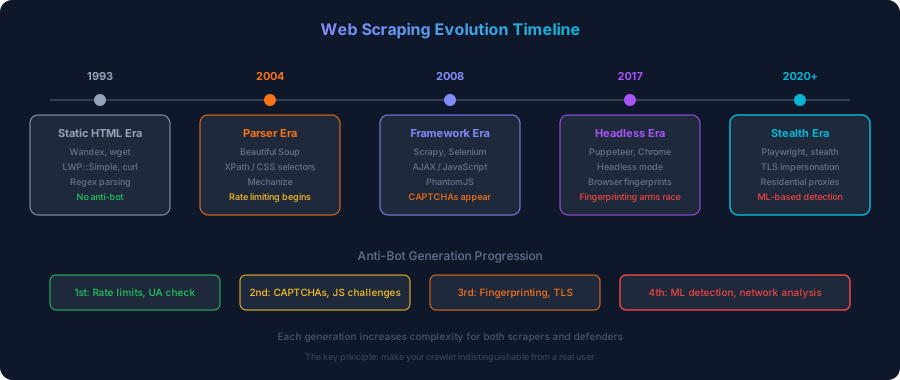
Part 2: Modern Web Scraping Techniques
The Modern Stack
Today’s production-grade crawler looks more like a distributed system than a simple script. The stack typically includes:
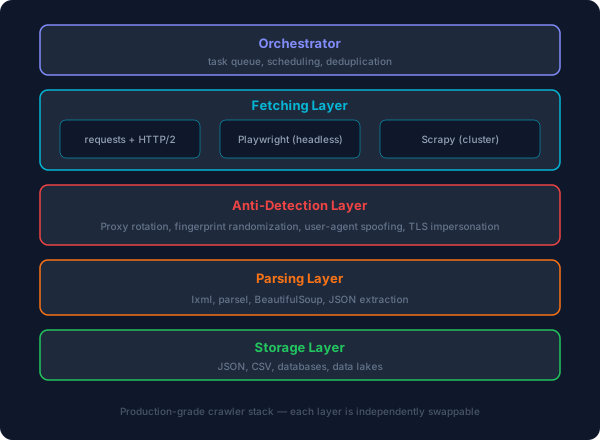
Technique Comparison
| Technique | Speed | JS Support | Anti-Bot Evasion | Complexity | Use Case |
|---|---|---|---|---|---|
requests + parser |
Very fast | None | Low | Low | Static HTML sites, APIs |
httpx + parser |
Fast | None | Low | Low | Modern async HTTP, HTTP/2 |
| Scrapy | Fast | Limited | Medium | Medium | Large-scale crawls of static sites |
| Scrapy + Splash | Medium | Full | Medium | Medium | JS-rendered pages at scale |
| Playwright | Slow | Full | High | High | Complex interactions, anti-bot |
| Playwright + stealth | Slow | Full | Very high | Very high | Hardened targets |
| Commercial APIs | Varies | Varies | Handled | Low | When you don’t want to build |
Anti-Bot Detection and Evasion
Modern anti-bot systems (Cloudflare, Akamai Bot Manager, PerimeterX, DataDome) look at multiple signals:
1. TLS Fingerprinting (JA3/JA4)
Every TLS client negotiates a unique set of cipher suites, extensions, and elliptic curves. This creates a fingerprint (JA3 hash) that identifies the client software. A Python requests session has a different JA3 hash than Chrome. Anti-bot systems flag non-browser fingerprints.
Countermeasures: Use curl_cffi (Python bindings for curl-impersonate), or run a real browser via Playwright.
2. Browser Fingerprinting
Websites collect browser attributes: screen resolution, installed fonts, WebGL renderer, canvas hash, audio context, navigator properties. Headless browsers often have distinctive fingerprints (missing plugins, default viewport, no WebGL support).
Countermeasures: Use playwright-stealth or undetected-chromedriver to normalize fingerprints.
3. Behavioral Analysis
Anti-bot systems track mouse movements, scroll patterns, keystroke timing, and click intervals. A script that loads a page and immediately extracts data behaves differently from a human.
Countermeasures: Simulate human-like behavior — random delays, mouse movements, scrolling, natural click patterns.
4. Network-Level Signals
IP reputation, ASN classification (datacenter vs residential), request frequency patterns, and connection reuse behavior all contribute to bot scoring.
Countermeasures: Residential proxy rotation, request throttling, connection reuse consistent with real browsers.
Human-Like Crawling: The Key Principles
When evading anti-bot detection isn’t about breaking anything — it’s about making your crawler indistinguishable from a real user. The core principles:
-
Delays with variance: Never use fixed intervals. Humans don’t click exactly every 2.0 seconds. Use
random.uniform(1.5, 4.2)or sample from a normal distribution. -
Scroll naturally: Real users don’t jump to the bottom instantly. Scroll in variable-sized increments with micro-pauses between them.
-
Mouse movement: Move the cursor in curved paths (Bézier curves), not straight lines. Dwell on elements before clicking.
-
Session warmth: A real user doesn’t immediately hit the target URL. Visit the homepage first, wait, then navigate to the target page.
-
Realistic headers: Match the headers your browser actually sends —
Accept,Accept-Language,Accept-Encoding,sec-ch-ua,sec-fetch-*. Never sendPython-requests/2.31.0. -
Viewport and screen: Use a realistic viewport size (1920x1080, 1366x768) and don’t maximize the window programmatically.
Part 3: Real-World Application — A Snapchat Discover Crawler
Let’s put these techniques into practice. We’re going to build a crawler that scrapes post metadata from Snapchat’s Discover feed at https://www.snapchat.com/discover.
Why Snapchat Discover?
Snapchat’s Discover page is a good example of a modern scraping target:
- Server-side rendered Next.js app with embedded Apollo GraphQL data
- Anti-bot protections via Akamai (behind the scenes)
- Dynamic content loaded progressively as you scroll
- Rich metadata per post: media URLs, publisher info, timestamps, media types
The goal: extract metadata for 1000 unique posts while behaving like a human user.
Architecture
The crawler uses Playwright (headless Chromium) with human-like interaction patterns:
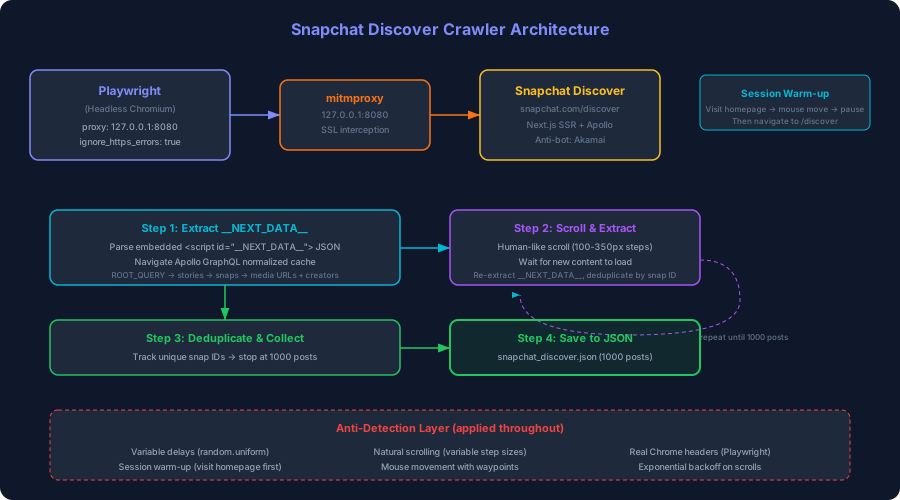
Understanding the Data Model
Snapchat’s Discover page embeds all its data in a <script id="__NEXT_DATA__"> tag as a JSON blob. This is Apollo GraphQL’s normalized cache — a flat dictionary where every entity has a unique key:
| Key Pattern | Type | Description |
|---|---|---|
ROOT_QUERY |
Query | Entry point — references the story feed |
SnapProStory:<username> |
Story | A public user’s story with snaps |
PremiumPublisherStory:<id> |
Story | A publisher/brand story (e.g., “Camping & More”) |
Snap:<id> |
Snap | Individual post — media URL, type, timestamps |
Publisher:<uuid> |
Publisher | Creator info — name, bio, snapcode |
A single page load yields ~10 stories with ~500 individual snaps. To reach 1000, the crawler will:
1. Load the page and extract the initial dataset
2. Scroll down to trigger infinite loading of more stories
3. Re-extract the dataset after each scroll
4. Deduplicate by snap ID
5. Stop at 1000 unique posts
The Crawler
https://github.com/Hunt-Benito/web-scraping-and-crawling-techniques-and-real-world-application
Key Code: Human-Like Scrolling
The most critical function is the human-like scroll simulation. Real users don’t teleport to the bottom — they scroll in variable-sized steps with pauses between them:
async def human_scroll(page, distance: int = 800):
    remaining = distance
    while remaining > 0:
        step = random.randint(100, min(350, remaining))
        await page.mouse.wheel(0, step)
        remaining -= step
        await asyncio.sleep(random.uniform(0.08, 0.25))
    await asyncio.sleep(random.uniform(0.5, 1.5))
Each scroll step is 100–350 pixels (a natural mouse wheel increment), with 80–250ms between steps, and a longer 0.5–1.5s pause after completing a full scroll gesture.
Key Code: Extracting Apollo Data
The extraction function reaches into the page’s DOM to pull the __NEXT_DATA__ JSON, then walks the Apollo cache to dereference all entities:
def extract_posts_from_apollo(apollo_state: dict) -> list[dict]:
    posts = []
    snap_ids_seen = set()

    for key, entity in apollo_state.items():
        if not isinstance(entity, dict):
            continue
        typename = entity.get("__typename", "")
        if typename not in ("SnapProStory", "PremiumPublisherStory"):
            continue

        story_meta = {
            "story_id": entity.get("id"),
            "story_type": typename,
            "story_title": entity.get("title"),
            "thumbnail_url": entity.get("thumbnailUrl"),
            "published_time": entity.get("publishedTimeInSec"),
        }

        creator_ref = entity.get("creator", {})
        if isinstance(creator_ref, dict) and "__ref" in creator_ref:
            creator = apollo_state.get(creator_ref["__ref"], {})
            story_meta["creator_name"] = creator.get("title") or creator.get("username")
            story_meta["creator_id"] = creator.get("businessProfileId") or creator.get("username")

        for snap_ref in entity.get("snaps", []):
            ref_key = snap_ref.get("__ref", "")
            snap = apollo_state.get(ref_key, {})
            if not snap or snap.get("id") in snap_ids_seen:
                continue
            snap_ids_seen.add(snap["id"])

            post = {**story_meta}
            post["snap_id"] = snap.get("id")
            snap_urls = snap.get("snapUrls", {})
            post["media_url"] = snap_urls.get("mediaUrl")
            post["media_preview_url"] = snap_urls.get("mediaPreviewUrl")
            post["media_type"] = snap.get("snapMediaType")
            posts.append(post)

    return posts
Key Code: Session Warm-Up
Before hitting the Discover page, the crawler warms up the session by visiting the homepage first — just like a real user would:
async def warm_up_session(page):
    await page.goto("https://www.snapchat.com/", wait_until="networkidle")
    await asyncio.sleep(random.uniform(2.0, 4.0))
    await page.mouse.move(
        random.randint(200, 600), random.randint(200, 400),
        steps=random.randint(15, 30)
    )
    await asyncio.sleep(random.uniform(1.0, 2.5))
Running the Crawler
Prerequisites:
$ pip install playwright asyncio
$ playwright install chromium
Basic run (direct connection):
$ python snapchat_discover_crawler.py
Run with proxy for traffic inspection:
$ mitmproxy -p 8080 &
$ python snapchat_discover_crawler.py --proxy http://127.0.0.1:8080
Expected output:
[*] Snapchat Discover Crawler v1.0
[*] Proxy: http://127.0.0.1:8080 (SSL errors ignored)
[*] Target: 1000 unique posts
[*] Warming up session... visiting snapchat.com
[*] Session warmed up (3.2s)
[*] Navigating to snapchat.com/discover
[*] Page loaded (4.8s)
[*] Extracted 487 posts from initial load
[*] Scrolling to load more content...
[*] Scroll 1: 612 total posts (+125 new)
[*] Scroll 2: 798 total posts (+186 new)
[*] Scroll 3: 956 total posts (+158 new)
[*] Scroll 4: 1134 total posts (+178 new)
[*] Target reached: 1134 unique posts collected
[*] Saved 1000 posts to snapchat_discover.json
[*] Total time: 47.3s
[*] Done.
Sample Output
The crawler produces a JSON file with structured metadata for each post:
{
  "crawl_metadata": {
    "timestamp": "2026-05-16T14:32:00Z",
    "total_posts": 1000,
    "source_url": "https://www.snapchat.com/discover",
    "proxy_used": "http://127.0.0.1:8080"
  },
  "posts": [
    {
      "story_id": "hassukhan.7",
      "story_type": "SnapProStory",
      "story_title": null,
      "creator_name": "hassukhan.7",
      "thumbnail_url": "https://cf-st.sc-cdn.net/d/...",
      "published_time": 1778879721,
      "snap_id": "If7GVneyTLK177u4-e9MZwA...",
      "media_url": "https://cf-st.sc-cdn.net/o/...",
      "media_preview_url": "https://cf-st.sc-cdn.net/d/...",
      "media_type": "VIDEO"
    }
  ]
}
Anti-Detection Techniques Used
| Technique | Implementation | Why |
|---|---|---|
| Proxy with SSL bypass | ignore_https_errors=True + proxy config |
Allows mitmproxy inspection without cert errors |
| Session warm-up | Visit homepage first, then navigate to target | Avoids the “direct hit” pattern bots exhibit |
| Variable delays | random.uniform() for all waits and pauses |
No timing fingerprints |
| Natural scrolling | Variable step sizes (100–350px) with micro-pauses | Matches human scroll wheel behavior |
| Mouse movement | Curved paths with random waypoints during warm-up | Fools mouse-tracking anti-bot systems |
| Realistic headers | Playwright sends genuine Chrome headers automatically | No Python-requests user-agent leakage |
| Page wait strategy | wait_until="networkidle" after navigation |
Ensures all dynamic content is loaded |
| Exponential backoff | Longer pauses between successive scrolls | Mimics diminishing engagement |
Sources
- Scrapy Documentation: https://docs.scrapy.org/
- Playwright Documentation: https://playwright.dev/python/
- Puppeteer Documentation: https://pptr.dev/
- JA3 TLS Fingerprinting: https://engineering.salesforce.com/tls-fingerprinting-with-ja3-and-ja3s-247362855967/
- JA4 Fingerprinting (RFC): https://engineering.salesforce.com/ja4-network-fingerprinting/
- curl-impersonate: https://github.com/lwthiker/curl-impersonate
- Beautiful Soup Documentation: https://www.crummy.com/software/BeautifulSoup/
- Snapchat Discover: https://www.snapchat.com/discover
- hiQ Labs v. LinkedIn (2017): https://en.wikipedia.org/wiki/HiQ_Labs_v._LinkedIn
- eBay v. Bidder’s Edge (2000): https://en.wikipedia.org/wiki/EBay_v._Bidder%27s_Edge
- OWASP Web Security Testing Guide: https://owasp.org/www-project-web-security-testing-guide/
- Scrapinghub/Splash: https://github.com/scrapinghub/splash
- Wandex — First Web Search Engine: https://en.wikipedia.org/wiki/World_Wide_Web_Worm
- Cloudflare Bot Management: https://www.cloudflare.com/products/bot-management/
- undetected-chromedriver: https://github.com/ultrafunkamsterdam/undetected-chromedriver